Fujifilm X-M5, X-S20 & X-S10 Recipe Guide: Mastering C1–C4 Mode Dial Slots Over Bluetooth & USB
If you shoot on a Fujifilm X-M5, X-S20, or X-S10, your camera handles film recipes differently from an X-T5 or X100VI in two crucial ways: you have four custom slots (C1–C4) instead of seven, and those four slots live directly on your physical PASM mode dial.
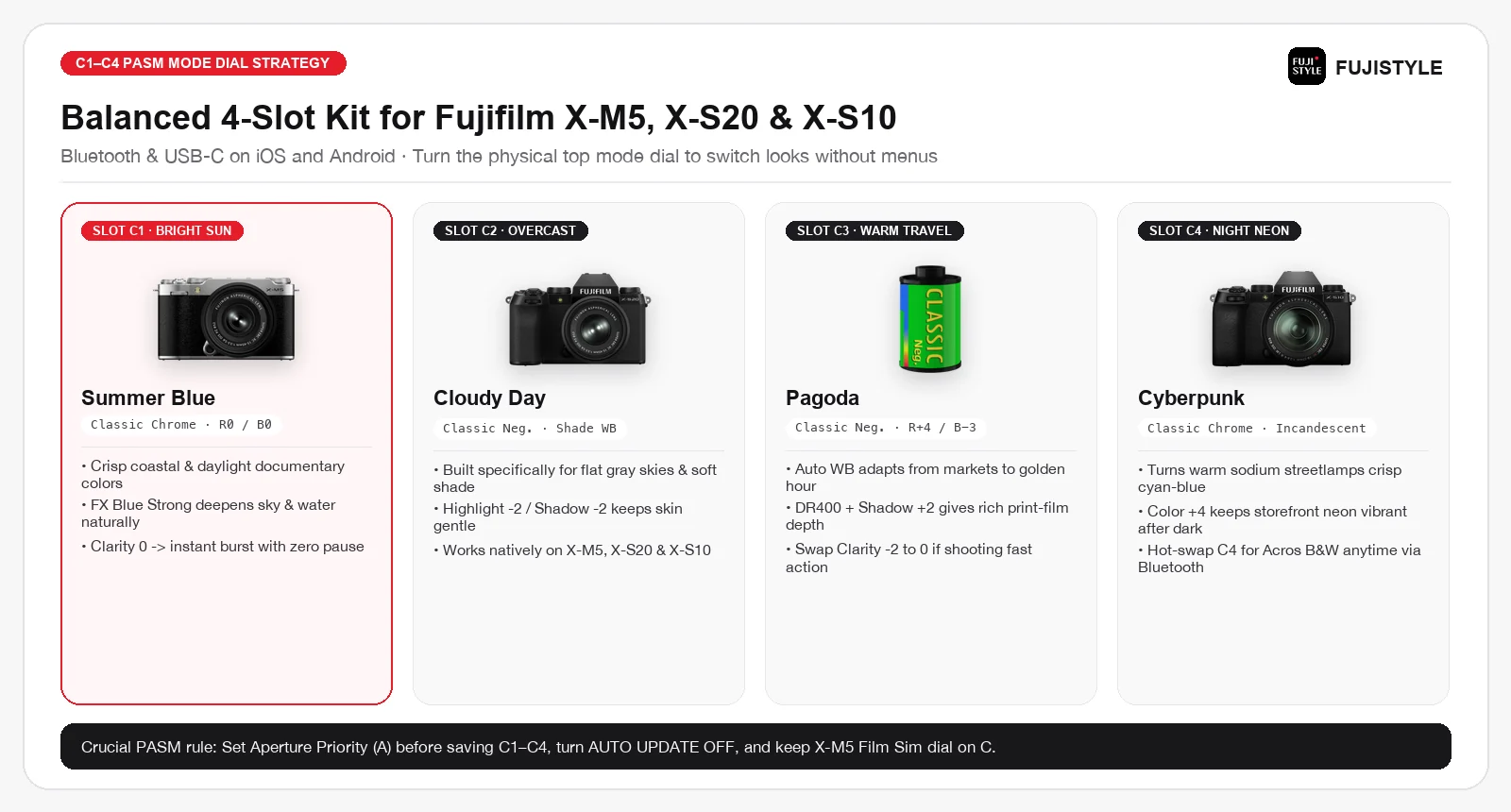 A ready-to-shoot 4-slot mode-dial layout covering bright daylight, overcast shade, warm travel, and night neon on X-M5, X-S20, and X-S10.
The good news is that all three cameras support wireless Bluetooth recipe import and USB-C cable import on both iPhone and Android in FujiStyle. Once you understand how PASM mode-dial slots store exposure settings, how the X-M5’s Film Simulation dial interacts with C1–C4, and how to curate a balanced four-slot kit, turning a physical dial between four dialed-in looks is actually faster than diving into menus on seven-slot bodies.
X-M5 vs X-S20 vs X-S10: recipe capability comparison
Before picking recipes from the community library, check which film simulations your body carries — especially if you shoot on an X-S10 or an X-S20 running older firmware:
| Feature | Fujifilm X-M5 | Fujifilm X-S20 | Fujifilm X-S10 |
|---|---|---|---|
| Processor & Sensor | X-Processor 5 · X-Trans CMOS 4 | X-Processor 5 · X-Trans CMOS 4 | X-Processor 4 · X-Trans CMOS 4 |
| Custom Slots | C1–C4 (on top mode dial) | C1–C4 (on top mode dial) | C1–C4 (on top mode dial) |
| Bluetooth Wireless Import | Yes (iOS & Android) | Yes (iOS & Android) | Yes (iOS & Android) |
| USB-C Cable Import | Yes (iOS & Android) | Yes (iOS & Android) | Yes (iOS & Android) |
| Film Simulations | 20 (includes Reala Ace & Nostalgic Neg) | 20 (Reala Ace added in firmware 3.00+) | 18 (has Classic Neg & Eterna Bleach Bypass; no Reala Ace or Nostalgic Neg) |
| Physical Film Simulation Dial | Yes (left shoulder) | No | No |
| Tone Curve Steps | 0.5-step increments | 0.5-step increments | 0.5-step increments |
Firmware note for X-S20 owners: If REALA ACE does not appear in your film simulation list, update your X-S20 to firmware 3.00 or newer before importing Reala Ace recipes — see before you update Fuji firmware and which cameras have Reala Ace.
How C1–C4 mode-dial slots work (and the PASM exposure nuance)
On menu-slot cameras like the X100VI, selecting C1 changes JPEG color settings while your physical shutter and aperture dials stay where they are. On PASM mode-dial cameras (X-M5, X-S20, X-S10), each C1–C4 dial position is a complete shooting preset:
- You must turn the mode dial to
C1,C2,C3, orC4to shoot the recipe. Leaving the dial onP,A,S, orMuses your base settings, and turning it toAUTOorSPdisables custom recipe curves completely. - Each
C1–C4slot remembers its own Shooting Mode (P,A,S, orM). FujiStyle writes only the image-quality recipe parameters and custom name, leaving your slot’s exposure mode untouched. After importing, turn the dial toC1, check whetherC1is set to Aperture Priority (A) or Manual (M) as you prefer, and save once inIMAGE QUALITY SETTING › EDIT/SAVE CUSTOM SETTINGif you want to change that slot’s exposure mode. - On the X-M5, check the left-shoulder Film Simulation dial: Turning the dedicated Film Simulation dial to a specific stock (like
VELVIAorACROS) can override the film simulation stored insideC1–C4while keeping the slot’s white balance shift and tone curve! Read our full breakdown in Film Simulation Dial vs Custom Recipes.
Step-by-step: importing recipes to C1–C4 over Bluetooth or USB
- Pair Bluetooth once via
PAIRING REGISTRATION(on X-M5 and X-S20 you will tap Pair on the phone prompt; on the X-S10, simply keep the camera on the pairing screen until FujiStyle connects — no system PIN popup appears on X-S10). Full screenshots are in our Bluetooth wireless import guide. - In FujiStyle, open a recipe, tap Apply Recipe, and choose Wireless (or USB Cable).
- FujiStyle automatically detects your camera’s 4-slot layout (
C1–C4) — you won't see phantom C5–C7 slots. - Pick
C1,C2,C3, orC4, give it a clear name (up to 15 ASCII characters), and tap Import.
The smart 4-slot strategy: how to pack C1–C4 without feeling limited
Having four slots instead of seven actually eliminates decision paralysis when you build your dial around four distinct lighting scenarios (adapted from our light-based slot framework):
| Dial Slot | Role on Location | Recommended Simulation Base | Why It Earns 1 of Your 4 Slots |
|---|---|---|---|
| C1 — Everyday Daylight | Sunny streets, travel, clean skin tones | Classic Chrome or Reala Ace (X-M5/X-S20) | Balanced contrast and natural greens/blues that rarely misfire from 9 a.m. to 4 p.m. |
| C2 — Golden Hour & Character | Late afternoon, cafés, nostalgic print color | Nostalgic Neg (X-M5/X-S20) or Classic Neg (all three) | Warm highlights and rich shadow separation when light drops low |
| C3 — Night, Neon & Indoor | Artificial tungsten, neon signs, rainy evenings | Eterna or Cinestill-style tungsten recipe | Cool/neutral Kelvin balance that keeps indoor lights and streetlamps from turning orange |
| C4 — Monochrome / Overcast | Flat grey skies, harsh midday contrast, timeless portraits | Acros (+R or +Ye) with Weak/Large grain | Saves shots when flat overcast light drains color out of the scene |
And whenever you head out for a specialized shoot — say a portrait session or an autumn hike — keep themed collections saved in FujiStyle on your phone and swap C1–C4 over Bluetooth in 15 seconds without unpacking a cable (see backing up C1–C7 & building travel Recipe Sets).
Ready-to-load 4-slot C1–C4 kit (works on X-M5, X-S20 & X-S10)
Every recipe below uses Classic Chrome or Classic Neg., so all four slots work natively across the X-M5, X-S20, and X-S10 over Bluetooth or USB:
Slot C1 (Sunny Daylight & Water): Summer Blue · Classic Chrome
 Summer Blue, shared on FujiStyle by Haihalu (shot on X-M5 · 441+ likes — crisp daylight look with
Clarity 0 for instant burst).
| Setting | Value |
|---|---|
| Film Simulation | Classic Chrome |
| White Balance | Daylight (R0 / B0) |
| Dynamic Range | DR100 |
| Highlight / Shadow | -1 / +1 |
| Color / Sharpness / NR | +2 / +1 / -4 |
| Clarity | 0 |
| Grain Effect | Weak / Small |
| Color Chrome / FX Blue | Strong / Strong |
Slot C2 (Overcast & Soft Shade): Cloudy Day · Classic Neg.
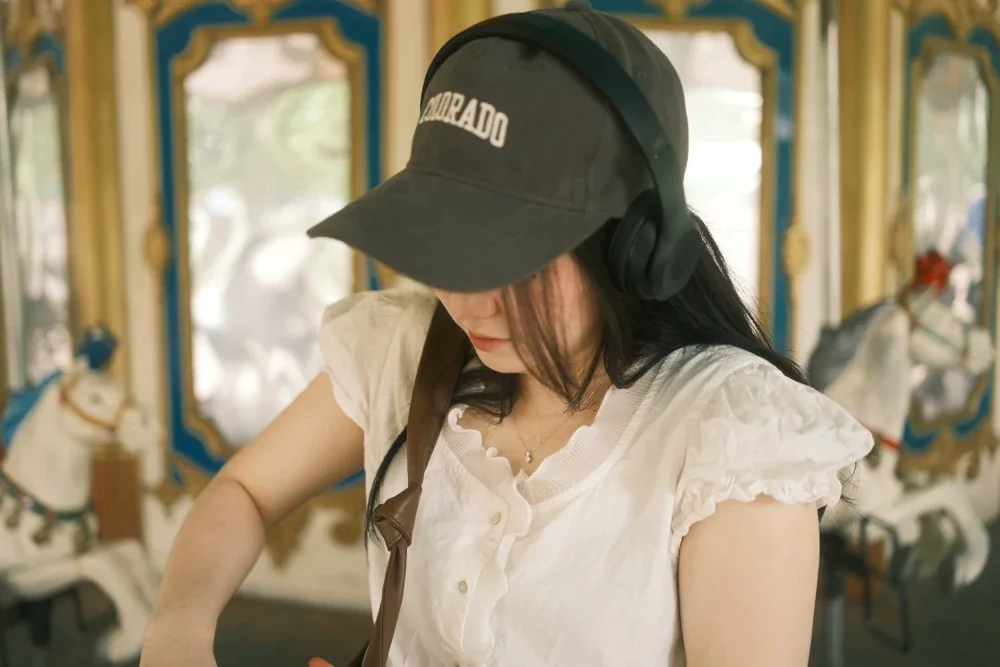 Cloudy Day, shared on FujiStyle by Cấn Anh Khải (shot on X-S20 — gentle contrast tailored for overcast skies and portraits in shade).
| Setting | Value |
|---|---|
| Film Simulation | Classic Neg. |
| White Balance | Shade (R-2 / B+2) |
| Dynamic Range | Auto |
| Highlight / Shadow | -2 / -2 |
| Color / Sharpness / NR | +1 / +1 / 0 |
| Clarity | 0 |
| Grain Effect | Off |
| Color Chrome / FX Blue | Strong / Weak |
Slot C3 (Warm Travel & Afternoon): Pagoda · Classic Neg.
 Pagoda, shared on FujiStyle by milcah_h (shot on X-M5 · 339+ likes — warm Auto WB travel look).
| Setting | Value |
|---|---|
| Film Simulation | Classic Neg. |
| White Balance | Auto (R+4 / B-3) |
| Dynamic Range | DR400 |
| Highlight / Shadow | -1 / +2 |
| Color / Sharpness / NR | +2 / 0 / -4 |
| Clarity | -2 (set to 0 for action) |
| Grain Effect | Weak / Small |
| Color Chrome / FX Blue | Strong / Weak |
Slot C4 (City Night & Neon): Cyberpunk · Classic Chrome
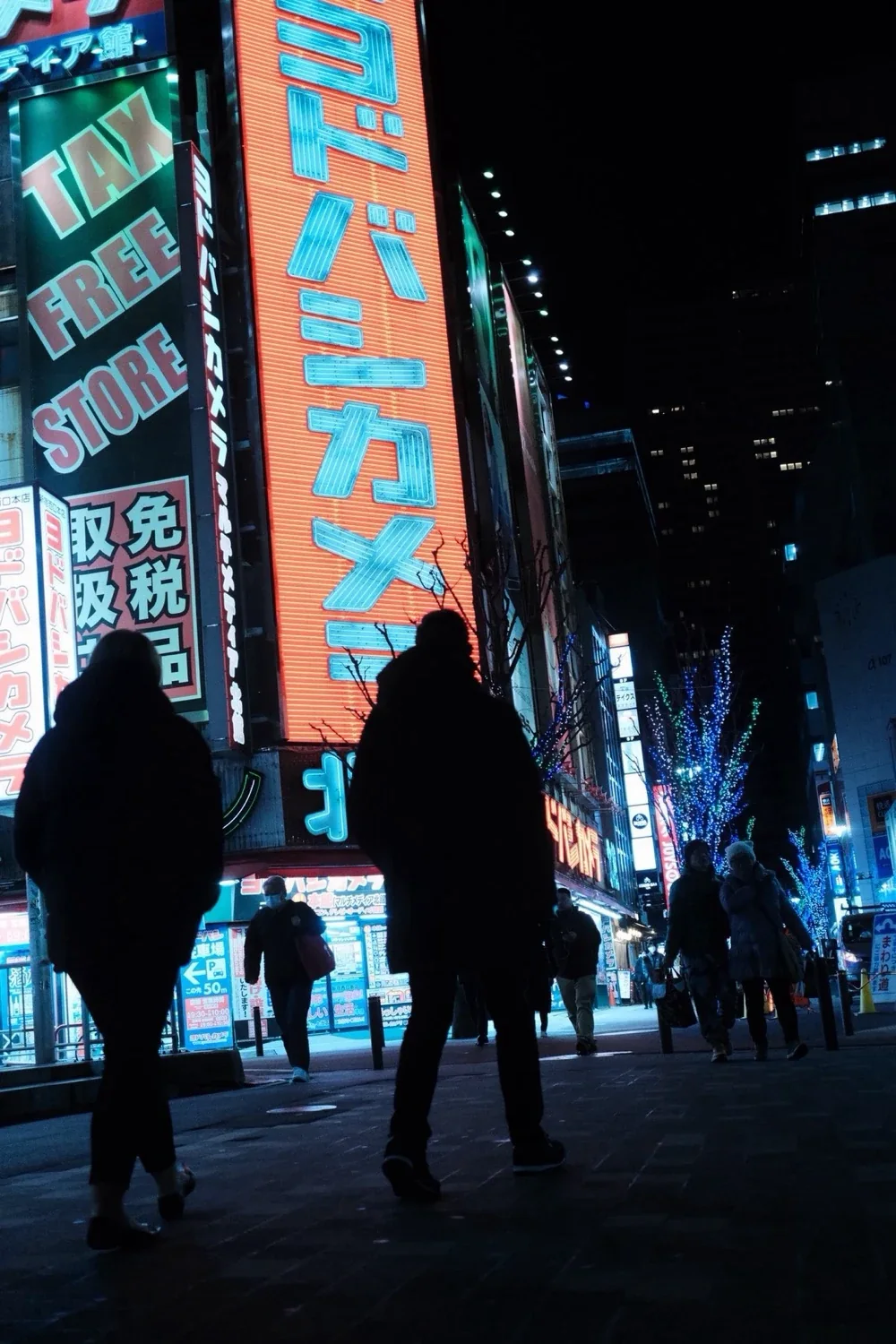 Cyberpunk, shared on FujiStyle by finest_albert (409+ likes — turns orange streetlamps cyan while keeping neon signs vivid).
| Setting | Value |
|---|---|
| Film Simulation | Classic Chrome |
| White Balance | Incandescent (R-3 / B+4) |
| Dynamic Range | DR400 |
| Highlight / Shadow | 0 / +1 |
| Color / Sharpness / NR | +4 / -2 / -4 |
| Clarity | -2 (set to 0 for handheld speed) |
| Grain Effect | Off |
| Color Chrome / FX Blue | Off / Off |
Frequently asked questions
Why do the Fujifilm X-M5, X-S20, and X-S10 only have C1–C4 instead of C1–C7?
Because X-M5, X-S20, and X-S10 use a physical PASM mode dial with four dedicated custom positions (C1, C2, C3, and C4) engraved on the dial. Unlike menu-slot bodies that hold seven slots, these three cameras store four in-camera slots at a time — and you switch recipes simply by turning the top mode dial.
Do the Fujifilm X-M5, X-S20, and X-S10 support wireless Bluetooth recipe import?
Yes. All three cameras — X-M5, X-S20, and X-S10 — support both wireless Bluetooth recipe import and USB-C cable import into C1–C4 in FujiStyle on iPhone and Android.
Does the Fujifilm X-S20 or X-S10 have Reala Ace and Nostalgic Neg?
The X-M5 ships with all 20 film simulations including Reala Ace and Nostalgic Neg. The X-S20 ships with Nostalgic Neg and gained Reala Ace in firmware 3.00 (update firmware first if Reala Ace is missing). The X-S10 has 18 film simulations (including Classic Neg and Eterna Bleach Bypass) and does not have Nostalgic Neg or Reala Ace.
Why did my Film Simulation dial override my C1–C4 recipe on the X-M5?
On the X-M5, the dedicated left-shoulder Film Simulation dial can override the film simulation saved inside C1–C4 if turned to a named film stock. Check your X-M5 manual for the dial position that defers to the custom slot’s saved film simulation.
What happens if I turn the mode dial to AUTO or P instead of C1–C4?
Turning the mode dial back to P, A, S, M, or AUTO exits your C1–C4 custom slots and returns to the camera’s base settings (and AUTO overrides custom tone and white balance settings altogether). Keep the mode dial on C1, C2, C3, or C4 whenever you want to shoot with your imported recipes.
How can I carry more than four recipes on an X-M5, X-S20, or X-S10?
Keep an unlimited library of bookmarks and Recipe Sets inside FujiStyle on your phone, load four complementary slots for today’s light into C1–C4, and swap any slot wirelessly over Bluetooth in about 15 seconds whenever the scene changes. Browse recipes filtered for your camera in the Fujifilm recipe library.

Import to Camera
Use the FujiStyle App to apply recipes to your Fujifilm camera.