Which Fujifilm Cameras Have Reala Ace? Check the Menu, Not the Generation
Which Fujifilm cameras have Reala Ace? Eight cameras ship with it: the GFX100 II, where the film simulation debuted in 2023, plus the X100VI, GFX100S II, X-T50, X-M5, GFX100RF, X-E5 and X-T30 III. Four more got it in a firmware update released on June 27, 2024: the X-T5 (firmware 4.00), X-H2 (5.00), X-H2S (7.00) and X-S20 (3.00). If you own one of those four and can't find it, update the firmware before you do anything else. The X-Processor 4 cameras, including the X100V, X-T4, X-Pro3, X-S10, X-E4 and X-T30 II, don't have Reala Ace, and no firmware has added it. Whatever a list says, this one included, the final word is your camera's film simulation menu. If REALA ACE isn't listed there, no app can put it there.
People usually ask this as "can my camera use this recipe?" Underneath sits a second question: is my camera still new enough? The tempting shortcut is sensor generation: X-Trans V has it, X-Trans IV doesn't. That shortcut is mostly right, and it fails in two places. The X-T5, X-H2, X-H2S and X-S20 didn't have Reala Ace at launch; it came later in firmware, so a camera that hasn't been updated won't show it. And the X-T30 III, X-M5 and X-S20 pair an X-Trans CMOS 4 sensor with the newer X-Processor 5, and all three have it. Across the cameras in this guide, Reala Ace follows the processor and the firmware, not the sensor. So my first rule is simple: check the menu, not the generation label.
The second rule is easier to argue with. If your camera doesn't have Reala Ace, don't try to fake it with Classic Neg and a WB Shift. Find a recipe built for a film simulation your camera already has. I'll explain why below, and where that rule stops applying.
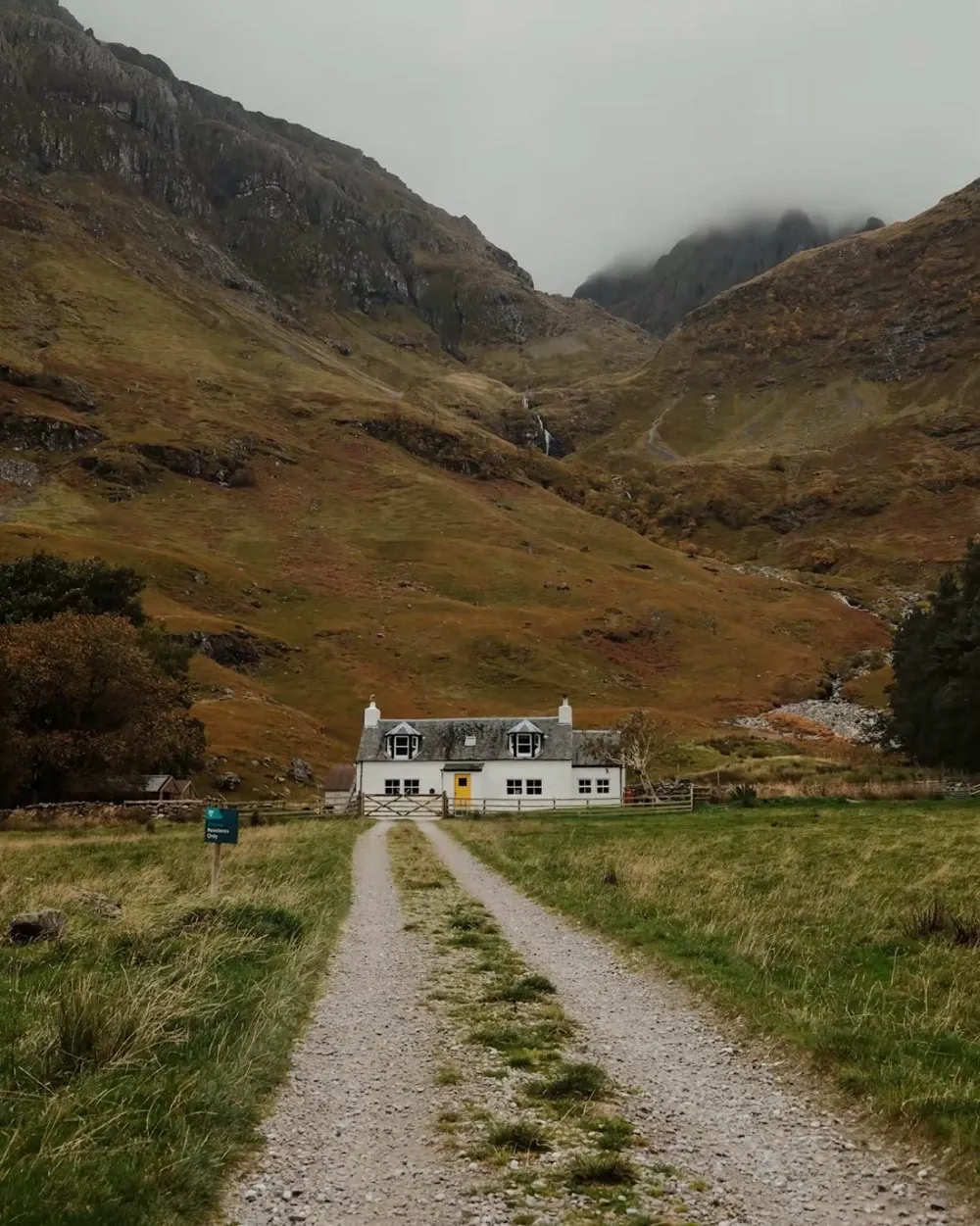 Scotland, shared on FujiStyle by emma
Why only the menu can answer: Reala Ace is a film simulation
Reala Ace is one of Fujifilm's built-in film simulations, first released on the GFX100 II in 2023; it comes with the camera's firmware, so a camera either lists it in the film simulation menu or it doesn't, and no phone app or recipe import can add it.
That's the difference between a film simulation and a recipe. A recipe is a set of camera settings: one film simulation, plus White Balance, WB Shift, Dynamic Range, Highlight, Shadow, Color, Grain Effect and so on. Most cameras have most of those settings, with different ranges. A film simulation is a single item in a menu. There's no partial support. It's there or it isn't.
As for the look, Fujifilm describes Reala Ace as faithful color with deep, soft shadows and hard highlights, and says it handles tricky colors like purple and yellow-green that older negative films struggled with. I cover how it looks and what light suits it on our Reala Ace film simulation page. This page answers one question: which cameras have it.
Which Fujifilm cameras have Reala Ace: the full list
Every row below comes from Fujifilm's own pages, checked on October 28, 2026. A spec page describes the camera as it launched, so a camera that ships with Reala Ace lists it there. For a camera that got it later, the firmware page is where it shows up. For the "no" rows I checked both where I could: the film simulation list on the spec page, and every entry on the firmware page up to the latest version. The table answers one thing, whether Reala Ace is in the menu. It doesn't tell you whether a given app can connect to that camera; that's a different list, and it's worth keeping the two apart.
| Camera | Reala Ace | How | Source |
|---|---|---|---|
| GFX100 II | Yes | Ships with it (where it debuted) | Spec page |
| X100VI | Yes | Ships with it | Spec page |
| GFX100S II | Yes | Ships with it | Spec page · Firmware |
| X-T50 | Yes | Ships with it | Spec page |
| X-M5 | Yes | Ships with it | Spec page |
| GFX100RF | Yes | Ships with it | Spec page · Firmware |
| X-E5 | Yes | Ships with it | Spec page |
| X-T30 III | Yes | Ships with it | Spec page |
| X-T5 | Yes | Firmware 4.00 (June 27, 2024) | Firmware |
| X-H2 | Yes | Firmware 5.00 (June 27, 2024) | Firmware |
| X-H2S | Yes | Firmware 7.00 (June 27, 2024) | Firmware |
| X-S20 | Yes | Firmware 3.00 (June 27, 2024) | Firmware |
| X100V | No | No (none through firmware 3.01) | Firmware |
| X-T4 | No | No (none through firmware 2.12) | Spec page · Firmware |
| X-Pro3 | No | No (none through firmware 2.00) | Spec page · Firmware |
| X-S10 | No | No (none through firmware 3.11) | Firmware |
| X-E4 | No | No (none through firmware 2.01) | Spec page · Firmware |
| X-T30 II | No | No (none through firmware 2.04) | Spec page · Firmware |
| X-T3 | No | No (none through firmware 5.11) | Spec page · Firmware |
| X-T30 | No | No (none through firmware 2.01) | Spec page · Firmware |
| GFX100S | No | No (none through firmware 2.13) | Spec page · Firmware |
| GFX50S II | No | No (none through firmware 2.12) | Spec page · Firmware |
| X-H1, X100F, X-Pro2, X-T2, X-T20, X-E3 | No | No firmware adds it | Firmware pages: X-H1 · X100F · X-Pro2 · X-T2 · X-T20 · X-E3 |
| GFX100, GFX 50S, GFX 50R, and any camera not listed here | Check the film simulation menu | — | — |
Reala Ace first shipped in 2023, so a camera released before that could only get it through firmware. Among the cameras in this table, the June 27, 2024 update to the X-T5, X-H2, X-H2S and X-S20 is the only time that has happened.
A few rows need one more sentence:
- X-T5, X-H2, X-H2S, X-S20. This is the June 2024 Reala Ace firmware update. None of the four had Reala Ace at launch, and all four got it the same day. If it isn't in your menu, update to the version in the table or later, rather than hunting for a "Reala Ace substitute" recipe. One trap: Fujifilm's spec pages for the X-T5 and X-S20 still list the 19 film simulations those cameras launched with, so if you go by the spec sheet, you'll conclude they don't have it. The firmware page is the one that's current.
- X-T30 III, X-M5, X-S20. All three use an X-Trans CMOS 4 sensor with X-Processor 5, and all three have Reala Ace (the X-S20 after its update). Reason from "fourth-generation sensor, so no Reala Ace" and these are exactly the three you'll get wrong.
- The "no" rows. I won't write "a future firmware might add it." I have nothing to base that on, and nobody should buy a camera, or hold on to one, on that kind of guess.
- GFX. Being a GFX doesn't settle it. The GFX100 II, GFX100S II and GFX100RF have Reala Ace; the GFX100S and GFX50S II, both X-Processor 4 cameras, list 19 simulations without it. For the older GFX bodies, go by the menu.
Can't find REALA ACE in the menu? Go in this order
The table is a forecast. The menu is the verdict. Where people actually get stuck is "the table says yes, but my menu doesn't show it," or "my camera isn't in the table." Go in this order, one question per step:
Is REALA ACE in your film simulation menu?
├─ Yes → done; this camera can use Reala Ace recipes
└─ No
   ├─ It's an X-T5, X-H2, X-H2S or X-S20
   │    → update to the June 27, 2024 firmware or later, then check the menu again
   │       ├─ It's there now → done
   │       └─ Still missing → trust the menu and treat it as "no"
   ├─ It's in one of the "no" rows
   │    → don't wait for an update; pick a recipe for a simulation it has
   └─ It's not in the table (older GFX bodies, anything released after this page)
        → don't guess from the generation; trust the menu, and if it's missing, treat it as "no"
There's no "which sensor generation is it?" step, and that's on purpose. Generation is a useful rough grouping, and I lean on it when comparing X-Trans IV and X-Trans V recipes. But for a yes-or-no question about one menu item, it's secondhand information. The X-T30 III is the example: an X-Trans CMOS 4 sensor, an X-Processor 5, and Reala Ace in the menu. Go by the sensor alone and you'd file it in the wrong row. The menu is firsthand, and checking it takes a few seconds.
What happens if you import a Reala Ace recipe into a camera without it
In the app I build, each film simulation is tagged with the groups of cameras that support it, and the app uses that to tell you whether a recipe fits your camera. That check only decides what the app tells you. It can't change what's in your camera's menu, which is why the last step in the tree above is always the menu.
Two common assumptions don't hold up:
- "An app can add Reala Ace to my camera." It can't. Importing a recipe writes settings into one of the camera's custom setting slots. It's the same as pressing through the menu yourself and saving the result, and whatever writes those settings can't create a menu item the camera doesn't have.
- "It'll just switch to Classic Neg." It won't. A recipe built on Reala Ace is a Reala Ace recipe. Putting a different simulation under the same numbers makes a different recipe, and further down I'll explain why that isn't a small change.
If you try to send one anyway, over USB or over Bluetooth, a film simulation the camera doesn't have can't be written, and it won't be swapped for another one; check that your camera's menu has it before you write. After any write, tap Camera Recipes and check the film simulation in that slot.
One more thing people ask in the same breath: a recipe only affects the JPEGs you shoot afterward with that custom setting selected. Photos you've already taken, and their RAF files, stay exactly as they were. Re-rendering a RAF you've already shot is a separate job: FujiStyle's Raw Darkroom sends the RAF back to the camera over USB and has the camera's own engine render it again, right on your phone (Fujifilm X RAW Studio does the same from a computer). The camera does the rendering, so the same rule applies: on a camera without Reala Ace, Reala Ace isn't on the list.
Reala Ace recipes in our community: what the gap says
In the FujiStyle community, Reala Ace recipes are a small share, and Classic Neg recipes far outnumber them. The reason isn't hard to see: Classic Neg has been on a lot of cameras for years, while Reala Ace is only on recent ones, so fewer people can shoot it, and fewer still have tuned a recipe on it and shared it.
So the small number says more about how many cameras have the simulation than about how good it is. If you shoot an X100V or X-T30 II and you've just seen a Reala Ace card with over a thousand likes, wondering whether it's time to upgrade is a normal reaction. As for why Fujifilm drew the line where it did, Fujifilm hasn't explained it publicly, so I won't guess whether it's a hardware limit or a product decision.
The same fact reads the other way, too: all those community recipes built on Classic Neg use a simulation the X100V and X-T30 II do have. Missing one film simulation means your camera is a generation older; it doesn't mean it takes worse pictures. Before you change cameras for one simulation, count how many community recipes already exist for the simulations in your menu.
Your camera has Reala Ace: where to start
Once you know your camera has it, the quickest way in is to borrow a recipe someone has already tuned on a similar camera and shoot straight-out-of-camera JPEGs with it. Here are a few well-liked Reala Ace cards on FujiStyle, with likes as of October 29, 2026. The camera is whatever the uploader filled in on the card, and the person who shared a card isn't necessarily the person who first made the recipe.
| Recipe | Shared by | Camera on the card | Likes |
|---|---|---|---|
| Scotland | emma | Not listed | 560 |
| Cinematic Reala Ace | theo-s | X-T5 | 84 |
| Oldscene | Diana | X-T5 | 43 |
| Warm Haze II | tonydeli7 | X100VI | 34 |
| Leica Like | Kelvin | X100VI | 33 |
Two of the five list an X-T5, one of the four firmware cameras: once updated, it runs the same Reala Ace as an X100VI. The cards also cover very different light, from Scotland's overcast hills to Oldscene's bright, creamy interiors, so it's worth opening a few before you pick one. You can browse more cards in our Fujifilm recipe library. Scotland's full settings are in the next section.
No Reala Ace? Should you fake it with Classic Neg and a WB Shift
This is common advice, and it has a real point. Chasing a newer simulation's look on an older one is a legitimate thing to do, and Classic Neg with a bit more red and a bit less blue in the WB Shift can give you warm, clean, light color. Recipes named "Reala Ace" but built on Classic Negative do circulate, and naming a recipe after a film is normal in this hobby. The catch: a card called "Reala Ace something" may not use Reala Ace at all, so before you check your camera against the table, check the card's Film Simulation line. The name doesn't count.
Still, I don't recommend treating the imitation as a stand-in for the real thing. Take Scotland, the recipe behind the photo at the top. Here are the card's settings:
| Setting | Value |
|---|---|
| Film Simulation | Reala Ace |
| White Balance | Daylight |
| WB Shift | R+3 / B-5 |
| Dynamic Range | Auto |
| Highlight | -2 |
| Shadow | +1 |
| Color | +3 |
| Sharpness | -1 |
| High ISO NR | -4 |
| Clarity | 0 |
| Grain Effect | Weak / Small |
| Color Chrome Effect | Weak |
| Color Chrome FX Blue | Off |
| Exposure Compensation | 0 |
| ISO | — |
Its WB Shift of R+3 / B-5, Highlight -2, Shadow +1 and Color +3 were all set relative to Reala Ace. Move the same numbers onto Classic Neg and they land on a different color and tone response, and the result usually looks like neither one. So if you want warm, light and soft on a camera without Reala Ace, build it as a new Classic Neg recipe, give it its own name, and tune it to your own light. I compare the two simulations in detail, including why a shared set of numbers stops meaning the same thing, in a separate guide, Reala Ace vs Classic Neg.
Here's where the rule stops. If you shoot an X100VI and an X100V side by side and want their JPEGs to match, pushing Classic Neg toward Reala Ace on the X100V is a reasonable engineering problem. In that case you're tuning how two cameras look together, not pretending the older one got a new simulation.
Back to the start: menu first, then the card, then the name
At the top I said to check the menu, not the generation label. Having gone through every row, I'd add one thing: the generation label isn't useless. It's good for a first guess and bad for a final answer, and only the menu gives the final answer. Push that one step further and you get the order for picking any recipe. First, which film simulations are in your menu. Second, whether the card's Film Simulation line is one of them. Only then, what the card is called. If you have Reala Ace, use recipes made for it. If you don't, skip the imitation and find a recipe written for a simulation you do have, such as Classic Chrome or Classic Neg. It will get you closer to what its author was after than any "Reala Ace alternative" will.
Frequently asked questions
Which Fujifilm cameras have Reala Ace?
The GFX100 II, X100VI, GFX100S II, X-T50, X-M5, GFX100RF, X-E5 and X-T30 III ship with Reala Ace, and the X-T5, X-H2, X-H2S and X-S20 got it in a firmware update on June 27, 2024; X-Processor 4 cameras such as the X100V, X-T4, X-Pro3, X-S10, X-E4 and X-T30 II don't have it. The reliable check is your camera's film simulation menu, and for a camera not on this list it's the only check. Don't go by sensor generation: the X-T30 III has an X-Trans CMOS 4 sensor and still has Reala Ace.
Does the X100V have Reala Ace?
No: the X100V's film simulation menu doesn't include Reala Ace, no firmware through version 3.01 has added it, and importing a recipe can't add it either. The X100VI ships with it. For similar clean color on an X100V, start from a Classic Neg recipe or another simulation the X100V has.
Can a firmware update add Reala Ace to my camera?
Among the cameras covered here, only four have gotten Reala Ace that way: the X-T5 (firmware 4.00), X-H2 (5.00), X-H2S (7.00) and X-S20 (3.00), all on June 27, 2024. If one of those doesn't show it, update to that version or later. On cameras without it, such as the X100V or X-E4, no firmware has added it, and I have no basis for saying one will.
Can an app add Reala Ace to an older camera?
No: film simulations come with the camera's firmware, and a recipe app only writes settings into the camera's custom setting slots, so it can't add a simulation that isn't in the menu. Don't expect a Reala Ace recipe to be quietly switched to Classic Neg either.
What should I use if my camera doesn't have Reala Ace?
Use a recipe written for a film simulation your camera has, rather than copying a Reala Ace recipe's numbers onto another base; the same WB Shift, Highlight and Shadow values land differently on a different simulation. For similar clean color, Classic Neg is the usual starting point on cameras that have it (the X-T3 and original X-T30 don't).
About the photo
The photo at the top comes from Scotland, shared on FujiStyle by emma; the card doesn't list a camera. A gravel track leads to a white cottage under hills with cloud sitting on their tops: flat overcast light, the kind that usually turns a JPEG gray and cool. Here the grass and bracken keep their olive and rust, and the cottage stays white rather than blue. That's the fixed Daylight white balance with R+3 / B-5 pulling cool light back toward warm, and Shadow +1 putting back some of the contrast an overcast day lacks. Reala Ace's part is faithful color: Fujifilm says it handles yellow-greens that older negative films struggled with, and this hillside is full of them. Move the same recipe into hard midday sun and Color +3 with Shadow +1 can start to feel heavy. With 560 likes as of October 29, 2026, it's one of the most-liked Reala Ace cards on FujiStyle.
A word on credit: each name here is the person who shared the card on FujiStyle, not necessarily the recipe's creator. If you know who made it first, or spot a wrong name or setting, tell us through the feedback option in the app and we'll correct it.
Writing a Reala Ace recipe to your camera
Once REALA ACE shows up in your menu, the next step is getting a Reala Ace recipe into a custom slot, and FujiStyle does that without pressing through the menu item by item. Open Fujifilm Community in the bottom bar: there are over 10,000 community recipes, each with sample photos and full settings, and the cards in the table above, Scotland and Cinematic Reala Ace included, open with a tap, so you can check that the Film Simulation line really says Reala Ace. Tap the green Apply Recipe, choose USB Cable or Wireless (Bluetooth or USB from an iPhone, USB from Android; our Bluetooth import guide lists the supported cameras), pick a C slot, rename it if you like, and wait for "Recipe Transferred." Then tap Camera Recipes to see what every custom slot on the camera holds right now and confirm the recipe landed where you meant it to.
If you have RAF files from this camera, you can try the recipe before it takes a slot. Connect the camera to your phone over USB (connection mode set to USB RAW CONV./BACKUP RESTORE; turn on OTG on Android), open Raw Darkroom, and let the camera's own engine re-render one of your photos with the recipe; if you like it, write it to a C slot. Raw Darkroom is on iOS and Android, the RAF has to come from the camera model you're connected to, and some bodies don't support it; the app tells you when you connect.
Writing replaces whatever was in that slot, with no undo, so save anything you want to keep to My Recipes first. On a camera without Reala Ace, the simulation can't be written and won't be swapped for another; pick from the Classic Neg cards instead, and there are far more of them. Next step: on an X-T5, X-H2, X-H2S or X-S20, update the firmware first, then open FujiStyle, search for Scotland, and write it to a free slot. Full setup steps are in our guide to adding recipes to your camera.

Import to Camera
Use the FujiStyle App to apply recipes to your Fujifilm camera.

