Supported Fujifilm cameras for wireless & USB recipe import
Short answer: FujiStyle writes film simulation recipes directly into custom settings slots on 23 Fujifilm cameras over Bluetooth wireless (23 on iPhone, 22 on Android) and 30 cameras over a USB data cable — no computer, no SD card reader, and no menu-by-menu typing required.
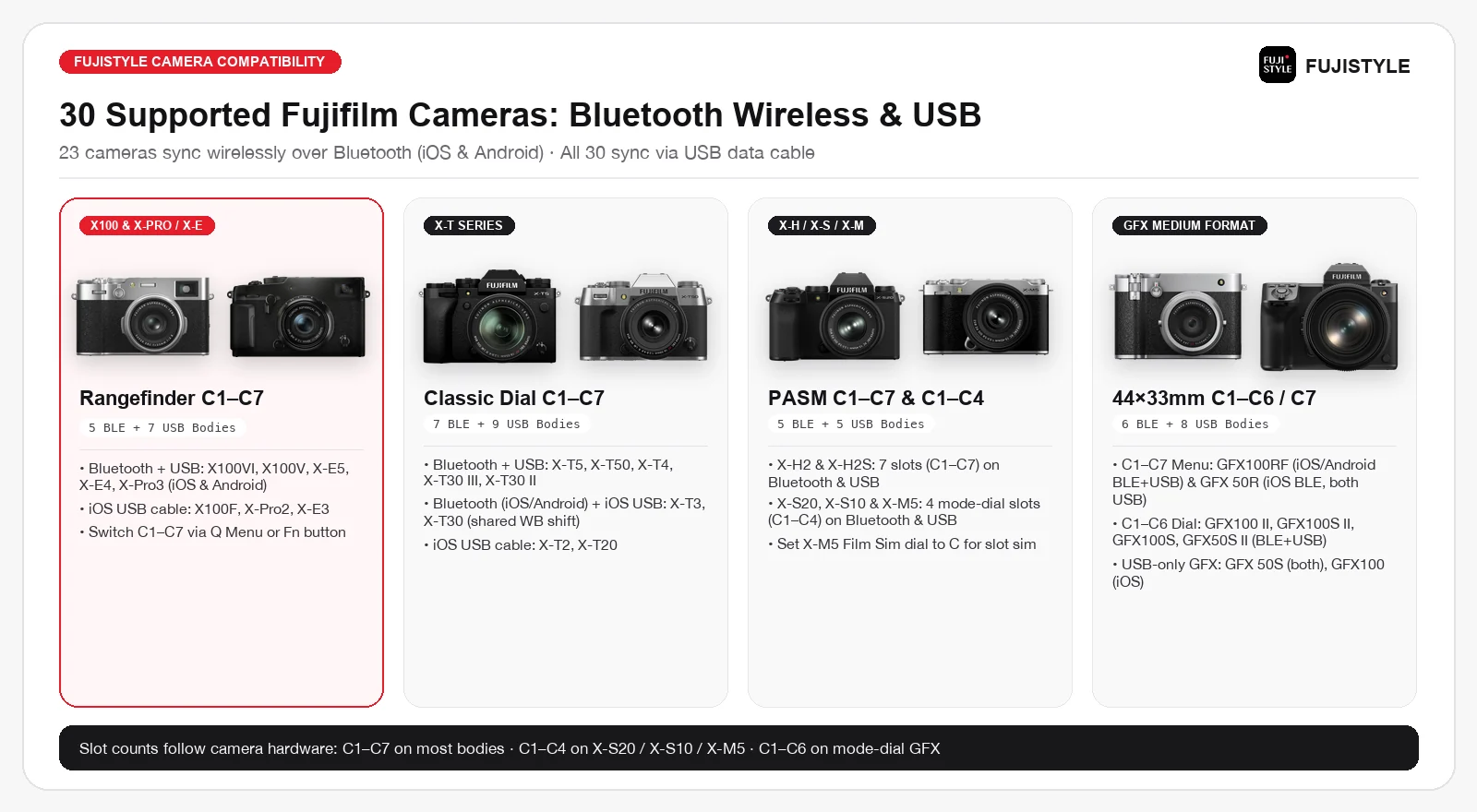
蓝牙无线导入
23
iOS 23 款 · Android 22 款(免数据线)
USB 数据线导入
30
双端直连 22 款 + iOS 专属 8 款
自定义槽位写入
C1–C7 / C6 / C4
写入后自动回读校验,不动照片卡
| 相机型号 | 槽位 | 蓝牙无线导入 | USB 有线导入 | 备注说明 |
|---|---|---|---|---|
X100VIX-Processor 5 | C1–C7 | iOS & Android | iOS & Android | — |
X100VX-Processor 4 | C1–C7 | iOS & Android | iOS & Android | — |
X100FX-Processor Pro | C1–C7 | — | 仅 iOS | 机身无蓝牙;支持 iOS USB 整机包导入 |
X-T5X-Processor 5 | C1–C7 | iOS & Android | iOS & Android | — |
X-T50X-Processor 5 | C1–C7 | iOS & Android | iOS & Android | 带胶片模拟拨盘(FS1–FS3) |
X-T4X-Processor 4 | C1–C7 | iOS & Android | iOS & Android | — |
X-T30 IIIX-Processor 5 | C1–C7 | iOS & Android | iOS & Android | 带胶片模拟拨盘(FS1–FS3) |
X-T30 IIX-Processor 4 | C1–C7 | iOS & Android | iOS & Android | — |
X-T30X-Processor 4 | C1–C7 | iOS & Android | 仅 iOS | 白平衡偏移同模式全机共享;USB 支持 iOS 整机包 |
X-T3X-Processor 4 | C1–C7 | iOS & Android | 仅 iOS | 白平衡偏移同模式全机共享;USB 支持 iOS 整机包 |
X-T2X-Processor Pro | C1–C7 | — | 仅 iOS | 机身无蓝牙;支持 iOS USB 整机包导入 |
X-T20X-Processor Pro | C1–C7 | — | 仅 iOS | 机身无蓝牙;支持 iOS USB 整机包导入 |
X-H2X-Processor 5 | C1–C7 | iOS & Android | iOS & Android | — |
X-H2SX-Processor 5 | C1–C7 | iOS & Android | iOS & Android | — |
X-S20X-Processor 5 | C1–C4 | iOS & Android | iOS & Android | C1–C4 位于模式转盘 |
X-S10X-Processor 4 | C1–C4 | iOS & Android | iOS & Android | C1–C4 位于模式转盘 |
X-M5X-Processor 5 | C1–C4 | iOS & Android | iOS & Android | C1–C4 位于模式转盘,带胶片模拟拨盘 |
X-E5X-Processor 5 | C1–C7 | iOS & Android | iOS & Android | — |
X-E4X-Processor 4 | C1–C7 | iOS & Android | iOS & Android | — |
X-E3X-Processor Pro | C1–C7 | — | 仅 iOS | 蓝牙不支持设置传输;支持 iOS USB 整机包导入 |
X-Pro3X-Processor 4 | C1–C7 | iOS & Android | iOS & Android | — |
X-Pro2X-Processor Pro | C1–C7 | — | 仅 iOS | 机身无蓝牙;支持 iOS USB 整机包导入 |
GFX100RFX-Processor 5 | C1–C7 | iOS & Android | iOS & Android | — |
GFX100 IIX-Processor 5 | C1–C6 | iOS & Android | iOS & Android | — |
GFX100S IIX-Processor 5 | C1–C6 | iOS & Android | iOS & Android | 蓝牙暂不写入档位名(参数正常写入) |
GFX100SX-Processor 4 | C1–C6 | iOS & Android | iOS & Android | — |
GFX50S IIX-Processor 4 | C1–C6 | iOS & Android | iOS & Android | — |
GFX 50RX-Processor Pro | C1–C7 | 仅 iOS | iOS & Android | iOS 已支持蓝牙无线;安卓蓝牙适配中 |
GFX100X-Processor 4 | C1–C6 | — | 仅 iOS | 支持 iOS USB 数据线导入 |
GFX 50SX-Processor Pro | C1–C6 | — | iOS & Android | 支持 USB 数据线导入(需支持备份/转换的固件) |
暂不支持直接传输(仅支持手动设置)的机型
以下机身因硬件无蓝牙备份通道或无 C1–C7 自定义配方槽位,无法通过蓝牙或 USB 直接写入。但你依然可以在 FujiStyle 中浏览 3,000+ 配方参数并在机身菜单中手动录入。
带蓝牙但机身不支持备份/设置传输
此类机身蓝牙协议不开放自定义档位备份读写,可在 FujiStyle 中查看配方参数后手动录入机身菜单。
早期 X-Trans I / II 与紧凑机型
早期机身早于富士无线与 USB 自定义档位写入协议,仍可筛选适配本机胶片模拟的配方后手动设置。
Wireless Bluetooth vs USB cable import: how FujiStyle connects
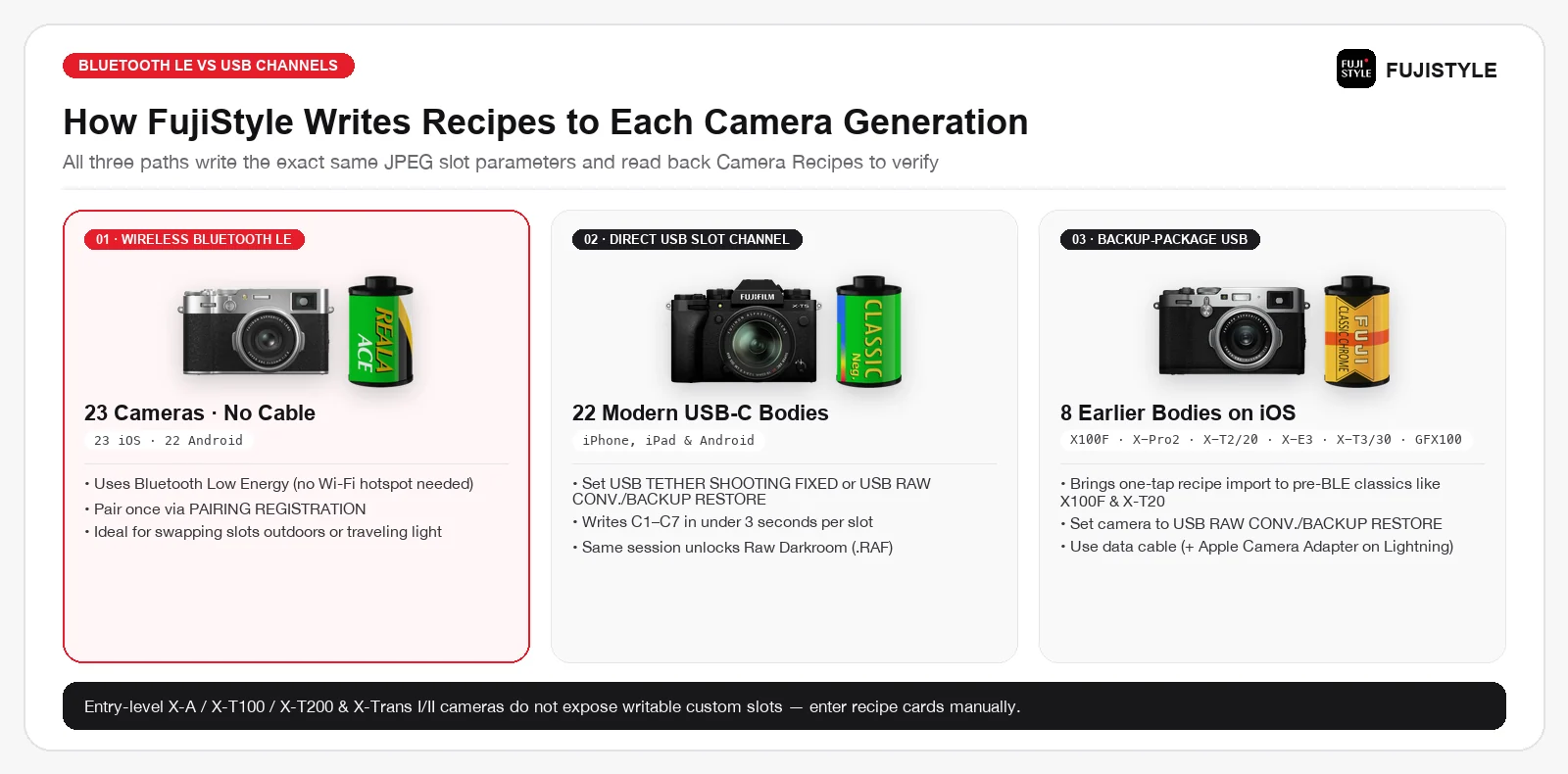
FujiStyle supports two direct phone-to-camera transfer methods. Both write the exact same JPEG recipe parameters — film simulation, Dynamic Range, Highlight and Shadow tone, Color, Sharpness, High ISO NR, Clarity, Grain Effect, Color Chrome Effect, Color Chrome FX Blue, and White Balance with R/B shift — into the custom slot you pick, then read the slot back to verify the write succeeded.
| Feature | Bluetooth Wireless | USB Data Cable |
|---|---|---|
| Supported bodies | 23 on iOS · 22 on Android | 30 total (22 iOS & Android + 8 iOS-only) |
| Hardware needed | None (uses camera Bluetooth, no Wi-Fi) | USB-C data cable (or Apple Camera Adapter on Lightning iPhone) |
| Camera menu setup | One-time PAIRING REGISTRATION | USB TETHER SHOOTING FIXED or RAW CONV./BACKUP RESTORE |
| Best for | Swapping C1–C7 slots outdoors with no cable in your bag | X-Processor Pro bodies (X100F, X-Pro2, X-T2), Raw Darkroom RAF rendering, or fast batch setup |
Wireless (Bluetooth) supported cameras by series (23 models)
Wireless recipe import works on both iPhone (iOS 16+) and Android (Android 7.0+) across X-Processor 5 and X-Processor 4 cameras, plus the GFX 50R on iOS. Step-by-step pairing screenshots are in our Bluetooth wireless recipe import guide.
- X100 series (C1–C7): X100VI and X100V on both iOS and Android. Activate slots via the Q menu or
SELECT CUSTOM SETTING— see X100VI & X100V recipe import tips. - X-T series (C1–C7): X-T5, X-T50, X-T4, X-T30 III, X-T30 II, X-T30, and X-T3 on both iOS and Android. On X-T3 and X-T30, white balance shift is stored per WB mode across slots.
- X-H series (C1–C7): X-H2 and X-H2S on both iOS and Android (update firmware to 5.00 / 7.00+ if you need Reala Ace).
- X-S & X-M series (C1–C4 on mode dial): X-S20, X-S10, and X-M5 on both iOS and Android. Turn the physical mode dial directly to C1–C4 to shoot — see mastering C1–C4 on X-M5, X-S20 & X-S10.
- X-E & X-Pro series (C1–C7): X-E5, X-E4, and X-Pro3 on both iOS and Android.
- GFX medium format (C1–C7 / C1–C6): GFX100RF (C1–C7), GFX100 II (C1–C6), GFX100S II (C1–C6), GFX100S (C1–C6), and GFX50S II (C1–C6) on both iOS and Android, plus GFX 50R (C1–C7) on iOS — see the Fujifilm GFX recipe import guide.
USB cable supported cameras (30 models)
USB recipe import uses two calibrated protocols under the hood so both modern USB-C bodies and classic X-Trans III cameras work reliably. Full cable and adapter checklists are in our USB-C & Lightning recipe import guide and how to add recipes to your camera.
- iOS & Android USB direct slot write (22 bodies): X100VI, X100V, X-T5, X-T50, X-T4, X-T30 III, X-T30 II, X-H2, X-H2S, X-S20, X-S10, X-M5, X-E5, X-E4, X-Pro3, GFX100RF, GFX100 II, GFX100S II, GFX100S, GFX50S II, GFX 50R, and GFX 50S. Also supports FujiStyle Raw Darkroom for re-rendering RAF files on your phone.
- iOS USB backup-package import (8 earlier bodies): X100F, X-Pro2, X-T2, X-T20, X-E3, X-T3, X-T30, and GFX100. Set the camera’s USB mode to
USB RAW CONV./BACKUP RESTOREand connect to your iPhone or iPad.
3 community starter recipes matched by camera generation
Once you confirm your camera’s connection path above, pick a starter recipe built on a film simulation your body includes and test a one-tap write into C1:
 Reala Ace
X-Processor 5 & Recent GFX
Scotland
Daylight · R+3 / B-5 · DR Auto · H-2 S+1 · Color +3 · Clarity 0
X100VI, X-T5, X-T50, X-S20, X-M5, X-E5, X-T30 III, GFX100RF, GFX100 II/S II
 Classic Neg.
X-Trans IV & Newer
Clockwise Negative
Auto WB · R+1 / B-3 · DR400 · H-1 S-1.5 · Color +4 · Clarity 0
X100V, X-T4, X-S10, X-E4, X-Pro3, X-T30 II, GFX100S, GFX50S II + all Gen 5
 Classic Chrome
All 30 Supported Cameras
Green Chrome
Daylight · R-2 / B-8 · DR400 · H-1 S+1 · Color +2 · Clarity 0
Works on X100F, X-T2, X-T20, X-Pro2, X-E3, X-T3, GFX 50R/50S + every newer body
Frequently asked questions
- How many Fujifilm cameras support wireless Bluetooth recipe import?
- 23 Fujifilm bodies support wireless Bluetooth recipe import in FujiStyle on iPhone, and 22 support it on Android — including the X100VI, X100V, X-T5, X-T50, X-T4, X-T30 III, X-T30 II, X-T30, X-T3, X-H2, X-H2S, X-S20, X-S10, X-M5, X-E5, X-E4, X-Pro3, GFX100RF, GFX100 II, GFX100S II, GFX100S, GFX50S II and GFX 50R (iOS).
- Which Fujifilm cameras support USB cable recipe import?
- 22 Fujifilm bodies support USB cable import on both iOS and Android (set the camera’s Connection Mode to USB TETHER SHOOTING FIXED or USB RAW CONV./BACKUP RESTORE). On iOS, FujiStyle also supports USB import for 8 additional bodies — X-T3, X-T30, X-Pro2, X100F, X-T2, X-T20, X-E3 and GFX100 — bringing total USB support to 30 cameras.
- Do the Fujifilm X100V, X-T4, X-Pro3 and X-E4 support Bluetooth recipe import now?
- Yes. All four X-Processor 4 bodies — X100V, X-T4, X-Pro3 and X-E4 — are supported for wireless Bluetooth recipe import into C1–C7 on both iPhone and Android, as well as USB cable import.
- Why do some cameras have C1–C4 or C1–C6 instead of C1–C7?
- Custom slot count is set by Fujifilm’s camera firmware: most X-series bodies and the GFX100RF / GFX 50R have C1–C7, medium-format GFX100 II / GFX100S II / GFX100S / GFX50S II / GFX100 / GFX 50S have C1–C6, and PASM mode-dial bodies (X-S20, X-S10, X-M5) have C1–C4.
- Why can’t the X100F, X-Pro2 or X-T2 import wirelessly?
- X-Processor Pro bodies (X100F, X-Pro2, X-T2, X-T20) do not have Bluetooth hardware, and the X-E3’s Bluetooth module does not transfer camera settings. On iPhone or iPad, FujiStyle imports recipes to all five cameras over a USB data cable into C1–C7.
- Can I import a Reala Ace or Nostalgic Neg recipe to an older camera like X100V or X-T3?
- FujiStyle writes every supported parameter cleanly, but a camera can only render film simulations built into its own firmware. If a recipe uses a simulation your body lacks (such as Reala Ace on an X100V or X-T4), FujiStyle skips that simulation field and reports what was skipped on the transfer confirmation screen.
- Does FujiStyle wireless import use Bluetooth or Wi-Fi?
- Bluetooth only. There is no camera Wi-Fi hotspot to join. Pair once via the camera’s PAIRING REGISTRATION menu, then tap Wireless inside FujiStyle whenever you want to write or read custom slots.

导入配方到相机
用 FujiStyle App 把配方应用到你的富士相机