X-Trans IV vs X-Trans V Recipes: What Survives the Import
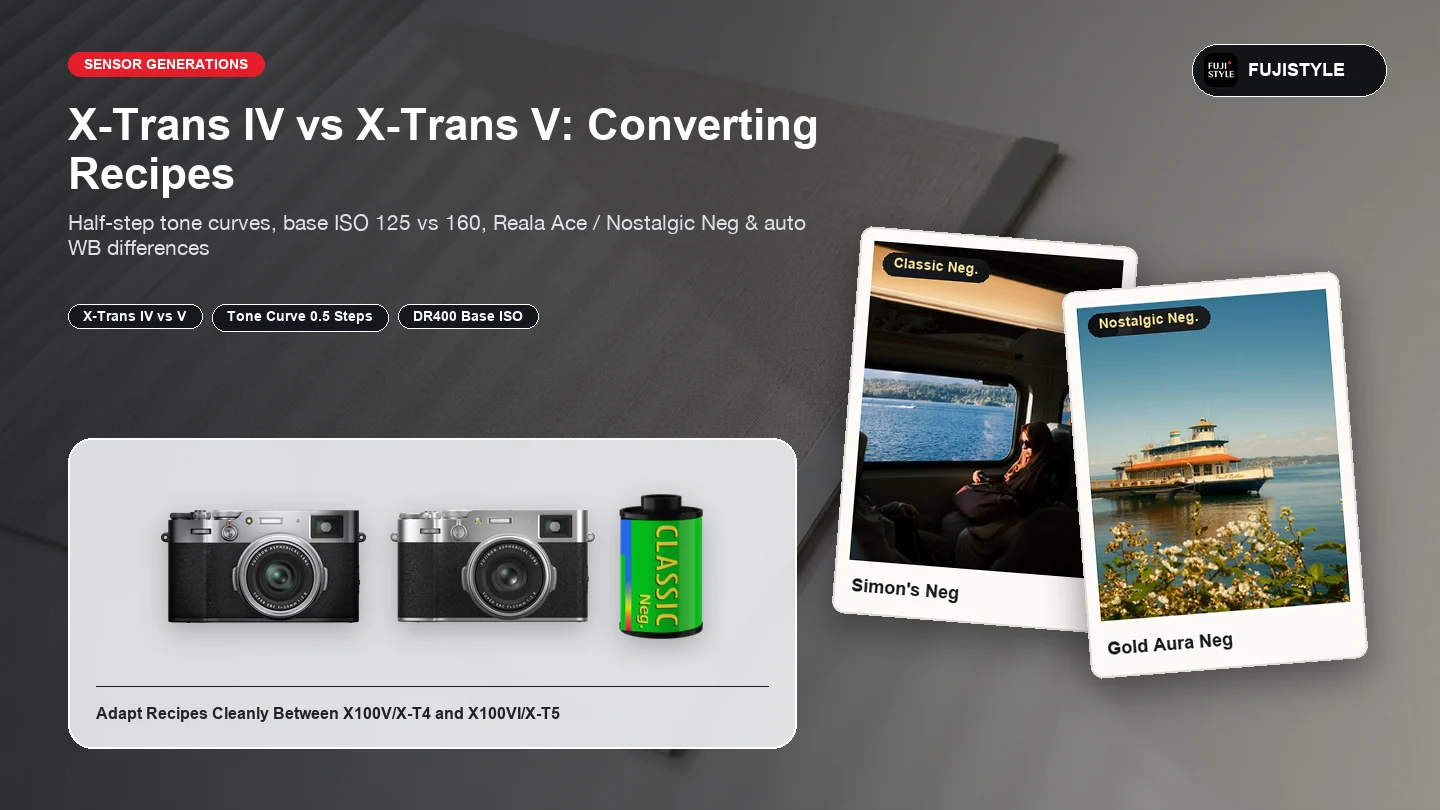
Are X-Trans IV and X-Trans V recipes interchangeable? If the only question is whether a recipe can be set at all, mostly yes. In the FujiStyle community, the recipes that can't get past a fourth-generation body are a small share, and nearly all of them use Reala Ace or Nostalgic Neg. (The X-T3 and X-T30 are the exception: they also lack Classic Neg., Eterna Bleach Bypass, FX Blue and Clarity, so far more recipes are blocked on those two.) The questions worth thinking through are two others. If a blocked recipe gets squeezed onto an older body with a similar simulation, is it still the same recipe? And for the ones that do fit, does the camera still produce the photo on the card?
That's the order this guide follows: first a comparison table of the two generations, then what happens when a body is missing an item at write time, then the two directions, newer recipes on fourth-generation bodies and older recipes on fifth-generation ones. The table shows at a glance where fourth- and fifth-generation recipes differ. This isn't about sensor theory or image quality. One ground rule up front: bodies are grouped by image processor, and for any individual camera, its own menu has the final word.
Definition: a recipe's generation compatibility means whether every film simulation and setting the recipe relies on exists in the target camera's menus. It only answers "can it be set exactly as written?"; it doesn't promise that two cameras will produce the same color.
In a hurry? Find your camera:
- Fifth-generation recipe on a fourth-generation body: most can be copied as written; those using Reala Ace or Nostalgic Neg. can't. On the X-T3 and X-T30, also avoid Classic Neg., Eterna Bleach Bypass, and recipes that use FX Blue, Clarity or grain size; on the X-Pro3 and X100V, avoid Eterna Bleach Bypass.
- Older recipe on a fifth-generation body: every setting can be entered as written. Shoot a test set with plenty of blue sky first, then decide whether to touch FX Blue.
- X-S20, X-M5, X-T30 III: treat them as fifth generation; see the note in the next section.
What X-Trans is, and which cameras count as fourth and fifth generation
X-Trans is the sensor used in most Fujifilm X-series bodies, and IV and V are its generations. For recipes, though, what matters isn't the sensor itself but which options that generation's menus include. So let's pin down the terms, to avoid clashing with how they're used elsewhere. On this page, "fourth generation" and "fifth generation" are grouped by image processor: X-Processor 4 and X-Processor 5. People often argue about which generation looks "more Fujifilm"; this page doesn't take sides on that, it only asks whether a recipe makes the trip. The community usually says X-Trans IV / X-Trans V, but sensors and processors don't always change generation together, and grouping by processor tracks what's actually in the menus more closely:
- Fourth generation (X-Processor 4, usually called X-Trans IV): X100V, X-T4, X-T3, X-T30, X-T30 II, X-S10, X-Pro3, X-E4.
- Fifth generation (X-Processor 5): X100VI, X-T5, X-T50, X-H2, X-H2S, X-E5; plus the X-S20, X-M5 and X-T30 III, covered in the note below.
Note: the X-S20, X-M5 and X-T30 III pair an X-Trans CMOS 4 sensor with X-Processor 5, so they are fifth-generation-processor cameras. Film simulations follow the processor, and according to Fujifilm's official specifications all three have Reala Ace and Nostalgic Neg. Precisely because they combine a new processor with an older sensor, don't guess what they're missing from the sensor generation.
The GFX series is outside the scope of this page.
X-Trans IV vs X-Trans V comparison: what's in the recipe decides where it can go
| If the recipe uses | Fourth generation (X-Processor 4) | Fifth generation (X-Processor 5) | Notes |
|---|---|---|---|
| Classic Chrome | Can be set | Can be set | Only some earlier X-Trans II bodies have it; check those one by one in the menu |
| Classic Neg., Eterna Bleach Bypass | Can be set (the X-T3 and X-T30 have neither; the X-Pro3 and X100V have no Eterna Bleach Bypass) | Can be set | Being able to set it doesn't mean the photos match; see the next section |
| Eterna | Can be set | Can be set | Every fourth-generation body has it; check earlier bodies in the menu |
| Acros | Can be set | Can be set | Every body from X-Trans III on has it |
| Nostalgic Neg. | No, it isn't in the menu | Can be set | The X-T30 III has it (Fujifilm's official specifications) |
| Reala Ace | No, it isn't in the menu | Can be set | The X-T5, X-H2 / X-H2S and X-S20 got it through official firmware updates in 2024, so update first if your menu lacks it; the X-T30 III has it (Fujifilm's official specifications) |
| Color Chrome Effect | Can be set | Can be set | What it does: see Color Chrome FX Blue |
| Color Chrome FX Blue, Clarity | Can be set (not on the X-T3 and X-T30) | Can be set | |
| Grain Effect Small / Large | Can be set (the X-T3 and X-T30 have no grain size) | Can be set | How to use grain size: see Grain Effect |
| Only white balance, WB Shift, DR or Highlight / Shadow differ | Can be set | Can be set | DR200 and DR400 have minimum ISO requirements; see dynamic range |
The only real walls between the two generations are two rows: Nostalgic Neg. and Reala Ace. Everything else exists on both sides, with individual exceptions within a generation (mostly the X-T3 and X-T30); bodies within a generation were never uniform to begin with, which gets its own section below. The camera-by-camera list for Reala Ace is in which Fujifilm cameras have Reala Ace.
That wall doesn't block many recipes. In the FujiStyle community, recipes using Nostalgic Neg. or Reala Ace are a small share; most use Classic Chrome or Classic Neg., which both generations have (except that the X-T3 and X-T30 lack Classic Neg.). Still, Reala Ace and Nostalgic Neg. are the newer simulations, so as more people share recipes from fifth-generation bodies, the share that gets blocked will slowly climb.
What happens at write time if your camera is missing an item
Checking the menu is your side of things. On the app's side, FujiStyle decides whether a recipe can be written to your camera by checking a table of which bodies have each film simulation, matched against your camera model. Fourth-generation bodies don't have Reala Ace or Nostalgic Neg., so that part of the recipe can't be written. A film simulation your camera doesn't have can't be written, and it won't be swapped for another; check that your camera's menu has it before you write.
Why not "downgrade automatically" and write the closest simulation for you? Because "closest" is a judgment of taste. If the app made that call, you wouldn't even know you were shooting a modified recipe, and when the photos didn't match, you'd blame the camera.
Keep an eye on individual settings too. The X-T3 and X-T30 are the two earliest bodies in the fourth generation: they have no Color Chrome FX Blue or Clarity, their grain has no Small / Large size, and their film simulations don't include Classic Neg. or Eterna Bleach Bypass. If you shoot one of them, check the camera menu before writing.
So after a write, don't stop at the app's success message. Tap Camera Recipes to see what that slot on the camera now holds, then go through FX Blue, Clarity and grain in the camera menu, and head out once the two agree.
Newer recipes on fourth generation: without the simulation, it isn't the same recipe
A recipe built on Reala Ace or Nostalgic Neg. can't be loaded onto a fourth-generation body. There's no way around that.
The common workaround is to swap in something close: Classic Neg. or PRO Neg. for Reala Ace, Classic Chrome for Nostalgic Neg., and every other setting copied as is. The motive makes sense, and it isn't wrong, but it's worth being clear: once you change the film simulation, you have a new recipe, not a "fourth-generation version" of the original.
The reason is that every other setting in a recipe was tuned around that one simulation. Take this Reala Ace recipe, Scotland, shared on FujiStyle by emma:
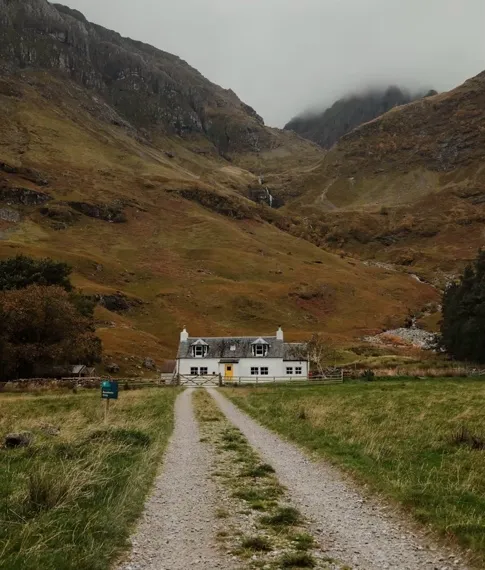 Scotland, shared on FujiStyle by emma.
| Setting | Value |
|---|---|
| Film Simulation | Reala Ace |
| White Balance | Daylight |
| WB Shift | R+3 / B-5 |
| Dynamic Range | Auto |
| Highlight | -2 |
| Shadow | +1 |
| Color | +3 |
| Sharpness | -1 |
| High ISO NR | -4 |
| Clarity | 0 |
| Grain Effect | Weak |
| Color Chrome Effect | Weak |
| Color Chrome FX Blue | Off |
| Exposure Compensation | 0 |
| ISO | — |
WB Shift R+3 / B-5, Highlight -2, Shadow +1, Color +3: these numbers were set against Reala Ace's base color. Swap out the base and they lose their reference point. Is the same R+3 / B-5 warmer or less warm on another simulation? Is Color +3 now too heavy? All of it has to be judged again. In the end you either accept a photo with a different character from the sample, or spend an afternoon re-tuning, which really means building a recipe of your own.
The other side deserves a fair hearing too: plenty of people don't care whether it's "the original." They just like the clean highland look in the sample, with its touch of warm autumn-grass gold, and want a starting point close to it on their older camera. That's perfectly reasonable.
The suggestion here is only about what to call it. Don't call it "Scotland, fourth-generation edition." Treat it as "a Classic Neg. recipe inspired by Scotland," and judge it by your own photos rather than pixel-matching it against the sample. For how Reala Ace and Classic Neg. actually differ, see our comparison of Reala Ace vs Classic Neg.; for the Nostalgic Neg. side, see Classic Chrome vs Nostalgic Neg.
Older recipes on fifth generation: every setting is there, so look at how much blue is in the frame
The other direction is much gentler. A fourth-generation recipe on a fifth-generation body can be set item by item exactly as written, so the write itself is no obstacle; the only open question is the output.
On how the two generations render, a common view is that the fifth generation shows deeper blues in Classic Chrome, Classic Neg., Eterna and Eterna Bleach Bypass, so people moving a recipe across lower Color Chrome FX Blue by one step. That varies with the scene, so it isn't this page's conclusion; the most reliable approach is to shoot a set of each in your own light, then decide.
Start with the recipe itself. In two cases, adjusting FX Blue won't help much. First, a recipe with FX Blue already Off has nowhere lower to go; to pull blue down you'd have to move the B value of the WB Shift, and at that point you're editing the recipe. Second, subjects with almost no blue in them (interiors, narrow alleys, warm-colored walls), where a slightly deeper or lighter blue simply doesn't show.
Here's a fourth-generation recipe from the community as an example. Spring was shared on FujiStyle by VanK, with an X-S10 listed on the card; it's built on Classic Neg. with FX Blue on Strong:
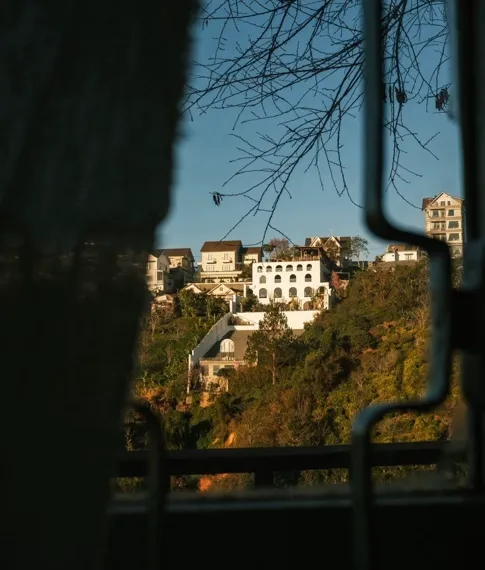 Spring, shared on FujiStyle by VanK; the card lists an X-S10.
| Setting | Value |
|---|---|
| Film Simulation | Classic Neg. |
| White Balance | Auto |
| WB Shift | R+4 / B-7 |
| Dynamic Range | DR400 |
| Highlight | 0 |
| Shadow | +2.5 |
| Color | +3 |
| Sharpness | +1 |
| High ISO NR | -4 |
| Clarity | -2 |
| Grain Effect | Strong / Large |
| Color Chrome Effect | Weak |
| Color Chrome FX Blue | Strong |
| Exposure Compensation | 0 |
| ISO | — |
The foreground is the deep shadow of a window frame; beyond it are white houses in warm light, trees and a whole block of clear sky. FX Blue is on Strong here, so there's exactly one step down to Weak. To use it on a fifth-generation body, write it as is first, then find a scene with a big area of sky, shoot a set and compare it with the sky in the sample. If you can't see a difference, leave it. If you can, and you don't like it, lower FX Blue one step to Weak and shoot the same sky again to confirm. Whether you change it should come from your own set of photos, not from a rule based on generation.
One more thing that often gets mixed in: an older recipe not looking right on a newer body isn't necessarily about generation. A different lens, different metering habits, and different light on your day versus the author's often matter more than the sensor generation. That's the subject of why online Fujifilm recipes never turn out the same; rule those out before you blame the generation.
X-T4 vs X-T5: can recipes move straight across?
The X-T4 and X-T5 are probably the most compared pair, and they happen to be one fourth-generation and one fifth-generation body. This section answers only the recipe question. It doesn't compare image quality or autofocus, and it won't tell you which to buy.
An X-T4 recipe can be set on the X-T5 exactly as written. Whether the photos come out bluer, test as described in the previous section. The other way round, an X-T5 recipe that uses Reala Ace or Nostalgic Neg. can't go onto the X-T4 in its original form; everything else copies straight across. Both bodies have seven custom slots, C1–C7, so you won't need to re-plan your slots after switching. For recipes that work on the X-T4, see X-T4 recipes; for the X-T5, see X-T5 recipes.
Not even within a generation are bodies uniform
Grouping bodies by generation is easy to remember, but it suggests every body in a group is the same. They aren't:
- Reala Ace: the X100VI, X-T50, X-M5, X-E5 and X-T30 III have it out of the box; the X-T5, X-H2 / X-H2S and X-S20 got it through official firmware updates in 2024, so update first if your menu lacks it. For every camera, see which Fujifilm cameras have Reala Ace.
- Eterna Bleach Bypass on the X-Pro3 and X100V: not there. It arrived with the X-T4. In the X-Pro3's official manual, Eterna appears only as ETERNA/CINEMA, and no firmware update (through Ver.2.00) has added Bleach Bypass; the X100V doesn't have it either. Go by the menu before writing.
- The earliest fourth-generation bodies: the X-T3 and X-T30 came first in this group. They have no Classic Neg., Eterna Bleach Bypass, Color Chrome FX Blue, Clarity or grain size (they do have Color Chrome Effect), so recipes that use those can't be set on them as written.
- Different slot counts: in the app, the X-S20, X-S10 and X-M5 have C1–C4, while most others have C1–C7. That has nothing to do with whether a recipe works; it only limits how many you carry at once. See C1–C7 custom settings.
The point of this section fits in one line: "generation" is handy shorthand, but the final judge is always the menu of the camera in your hands. For each generation's camera pages, see X-Trans IV recipes and X-Trans V recipes.
Got a recipe? Check it in this order
- Look at the Film Simulation line first. If it's Reala Ace or Nostalgic Neg. and your camera is fourth generation, stop there: you can't use the original version of this recipe. On the X-T3 and X-T30, the same goes for Classic Neg. and Eterna Bleach Bypass; on the X-Pro3 and X100V, for Eterna Bleach Bypass.
- Then check the "newer" settings. Color Chrome Effect, Color Chrome FX Blue, Clarity, grain size: does your menu have them? If something's missing, the recipe can still go in, but it won't be complete.
- Finally, test it in light you know well. For a recipe that fits, shoot a set with blue sky, shadows and people, and compare it with the sample. If the blue is off, move only FX Blue by one step and shoot again (for what this setting does, see Color Chrome FX Blue). If the whole look is off, suspect light and exposure before you suspect generation.
The first two steps answer "can it?"; only the third answers "is it?" Most people stop after the first two and then ask in the comments why their photos look different.
Frequently asked questions
Can I use X-Trans IV recipes on an X-Trans V camera?
You can set them, but the results aren't guaranteed to match the sample photos. When a recipe uses a film simulation both generations have, such as Classic Chrome, Classic Neg., Eterna or Acros, the settings can be entered exactly as written. As for the look, a common view is that the fifth generation renders blues deeper in Classic Chrome, Classic Neg., Eterna and Eterna Bleach Bypass, so you can lower Color Chrome FX Blue by one step. Results vary with the scene, so shoot a set with plenty of sky first, then decide whether to change it.
X-T4 vs X-T5: do recipes carry over?
Yes. Every setting in an X-T4 recipe exists in the X-T5's menus, so it can be set exactly as written. The limit runs the other way: an X-T5 recipe that uses Reala Ace or Nostalgic Neg. can't be loaded onto the X-T4 in its original form.
What is X-Trans?
X-Trans is the sensor used in most Fujifilm X-series bodies. Its color filters are arranged in an irregular 6×6 pattern rather than the 2×2 of a typical Bayer array; IV and V are its generations. For recipes, the sensor generation itself doesn't decide whether a recipe works; what decides it is which film simulations that generation's menus include.
Which film simulations are missing on X-Trans IV bodies?
Two: Reala Ace and Nostalgic Neg. Recipes that use either can't be used as written on fourth-generation bodies, and FujiStyle can't write them either. The X-T3 and X-T30 also lack Classic Neg. and Eterna Bleach Bypass, and the X-Pro3 and X100V lack Eterna Bleach Bypass. You can make a new recipe with a similar simulation, but the other settings were tuned around the original simulation, so they have to be re-judged after the swap, and the sample photos are no longer a useful reference. For a camera-by-camera check, see which Fujifilm cameras have Reala Ace.
Is the X-T30 III a fourth-generation or a fifth-generation camera?
By processor, fifth. It pairs an X-Trans CMOS 4 sensor with X-Processor 5, like the X-S20 and X-M5, so it counts as a fifth-generation-processor camera. Film simulations follow the processor, and according to Fujifilm's official specifications it has Reala Ace and Nostalgic Neg. For recipes for this camera, see X-T30 III recipes.
Can fifth-generation recipes be used freely across fifth-generation bodies?
In most cases, yes, but each body's menus are what count. For example, Reala Ace came to the X-T5, X-H2 / X-H2S and X-S20 through official firmware updates in 2024, so if your menu doesn't have it, update the firmware first; the X-T30 III has Reala Ace and Nostalgic Neg. out of the box (per Fujifilm's official specifications).
Why does the same recipe look different on two generations?
Most of the time it isn't the generation. The lens, metering, how white balance behaves under different light, and the light on the day you and the author each shot often matter more than the sensor generation. Rule these out first (see why online Fujifilm recipes never turn out the same), then consider generation-related settings such as Color Chrome FX Blue.
Back to the opening question: are X-Trans IV and V recipes interchangeable? More of them fit than you might expect, and the ones locked out are basically those built on Reala Ace or Nostalgic Neg. (the X-T3 and X-T30 are missing more; see above). Once one of those has its simulation swapped, judge it as a new recipe. As for whether a recipe that fits still looks right, that shouldn't be handed to a generation rule first. Checking the menu takes a minute; the real time goes into shooting a set in your own light before deciding whether to change anything.
About the photos in this guide
This guide borrows two community recipes, conveniently one per generation. Spring was shared on FujiStyle by VanK (the card lists an X-S10): behind the dark window frame are white hillside houses, trees and a whole block of clear sky, which makes it a good test of the "blue difference." That said, Shadow +2.5 and WB Shift R+4 / B-7 make the shadows very deep and the frame warm and yellow, so it isn't an obvious pick for indoor portraits.
Scotland was shared on FujiStyle by emma. Built on Reala Ace, its sample of a Scottish highland valley keeps the grassy slopes and the cottage clean and steady, which shows why a simulation fourth-generation bodies lack can't simply be "downgraded." Highlight -2 and Shadow +1 with Daylight R+3 / B-5 were set for an overcast highland day and may not suit harsh midday sun. Both recipes' settings are listed exactly as they appear on the cards. If you've shot either one on a body from the other generation, share the comparison in the community.
Each name here is the person who shared the card on FujiStyle, not necessarily the recipe's creator. If you know who made it first, or spot a wrong name or setting, tell us through the feedback option in the app and we'll correct it.
Bring it into your camera with FujiStyle
The last step in this guide is "load it, then compare in your own light," and FujiStyle puts every part of that on your phone: picking cards, writing them, re-rendering RAF files and reading settings back.
- Pick community recipes from your generation. Fujifilm Community in the bottom bar has over 10,000 user-shared recipes, each with sample photos, full settings and the camera the uploader listed, so starting with cards from bodies of your generation saves time. Community recipes themselves can't be edited; only your own recipes can. To make a comparison version with FX Blue one step lower, apply the card in Raw Darkroom, lower Color Chrome FX Blue one step and save it as a recipe, or create a new recipe of your own, fill it in from the card, and change it there.
- Write the original and the comparison version to C slots over Bluetooth or USB-C. Tap Apply Recipe and choose Wireless (Bluetooth import on 23 supported cameras with iPhone and 22 with Android, currently free for a limited time) or USB Cable (iPhone and Android), then write the original to one slot and your version to another. Writing overwrites the slot you choose with no undo, so save what was there to My Recipes first. A film simulation the camera doesn't have (such as Reala Ace or Nostalgic Neg. on a fourth-generation body) can't be written and won't be swapped for another. Afterwards, tap Camera Recipes to confirm which slot holds which, then shoot the same sky with each.
- See the difference in Raw Darkroom before giving up a slot. If you have
.RAFfiles from this camera, connect it to your phone with a USB data cable (connection modeUSB RAW CONV./BACKUP RESTORE, OTG on for Android) and open Raw Darkroom (iOS and Android). The connected camera's own engine renders the same photo with the original and with FX Blue one step lower; save the version you prefer as a recipe and write it to a C slot (some bodies aren't supported; the app tells you when you connect). - Read settings back from an original JPEG with the Recipe Reader. If you have Fujifilm JPEGs straight out of camera and want to check which film simulation, WB shift or FX Blue position was actually used, tap + › Import from Photo in the app or open the free web Recipe Reader to read 14–15 settings from the unstripped
MakerNotesand save them to My Recipes.
Next step: open FujiStyle, tap Camera Recipes, and see which two slots you can free up for this comparison.

Import to Camera
Use the FujiStyle App to apply recipes to your Fujifilm camera.